- Orderan dibawah 500.00 via Goshop / Offline / Marketplace
Slow WiFi? Here Is How to Make Your Internet Fast Again
Facing an internet connection that suddenly drops while you are enjoying a streaming session or chasing a tight task deadline is definitely a test of patience. Many people often wonder why their internet unexpectedly slows down out of nowhere. Yet in many situations, the main culprit actually comes from poor hardware placement or a buildup of junk data on the system. Knowing how to fix slow wifi on your own will be the quickest solution to a slow internet connection without having to wait for a technician from a professional computer store to come to your house.
By applying a few simple optimization steps to your device and router, you can restore your network speed to its maximum performance. Here is a practical guide that you can try right away today to make your internet connection smooth again without any interference.
Featured Snippet (Instant Answer):
The most effective way to fix slow WiFi is to reboot your router for 30 seconds to clear internal memory, relocate the router to an elevated open space away from thick walls or microwaves, and clear your web browser cache. Additionally, disconnecting unknown devices from your network restores your full bandwidth capacity instantly.
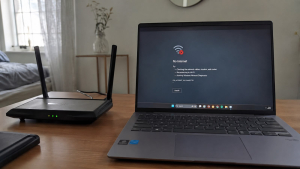
Checklist: Is Your WiFi Slow Due to Poor Placement or System Glitches?
Tick the boxes below if you are experiencing any of these common environmental or software factors:
-
[ ] Your router is placed in a hidden floor corner or blocked by thick concrete walls.
-
[ ] The transmitter device sits right next to other electronic appliances like microwaves.
-
[ ] Multiple smartphones, laptops, and smart TVs are connected to the same network simultaneously.
-
[ ] Search cache and browsing history on Google Chrome or other browsers have not been cleared in months.
-
[ ] Heavy background software is performing automatic system updates or downloads in the background.
Our Recommendation: If you checked two or more boxes above, your internet drop is likely caused by everyday technical factors that you can easily resolve yourself without calling your internet service provider.
Data Benchmark: Environmental Impacts on WiFi Signal & Bandwidth
| Router Environment | Signal Strength | Bandwidth Stability | Real-World Impact on Connection |
|---|---|---|---|
| Elevated & Open Space | Very Strong Everywhere | Optimal & Unhindered | Smooth streaming, stable gaming ping, fast downloads |
| Blocked by Thick Walls | Weakens Significantly | Frequent Auto-Disconnections | Web pages load very slowly and buffer constantly |
| Near Microwaves / Electronics | Signal Interference | Unstable Bandwidth | Full signal bars but internet freezes completely |
How to Fix Slow WiFi with Easy Steps
You do not need to be a network expert to speed up a dropping internet connection. Try these basic technical tricks to restore your WiFi speed:
-
Restart Your Router Regularly. Just like computers, a router that stays on continuously for weeks will experience system saturation because its memory gets full. Turning off the router for about 30 seconds and then turning it back on is the most instant way to refresh the network system. This simple step will clear residual data errors and look for a cleaner new frequency channel.
-
Move the Router to an Open Area. WiFi signals radiate in all directions and their strength weakens if they have to penetrate solid objects. Hiding the router inside a cabinet or in a hidden floor corner is a big mistake. Try moving the transmitter device to a higher and more open spot in the center of the room so the signal can spread evenly without physical barriers.
-
Clear Cache and Limit Background Apps. Sometimes the issue is not the WiFi network itself but the device you are using. Junk files or cache accumulating in Google Chrome or other browsers can slow down data loading. Clear your entire browsing history routinely and ensure there are no heavy apps performing automatic downloads secretly in the background.
-
Disconnect Unknown Devices. The more people using your WiFi, the thinner the internet speed quota for each device becomes. Log into your router settings and check the list of connected devices. If you see any foreign devices hitching a ride, change your WiFi password immediately to a more complex combination so it cannot be easily cracked by neighbors.
Signs of WiFi Issues from Hardware Damage
There are times when slow internet is not caused by the service provider or the router position, but rather a damaged signal receiver component inside your laptop. You need to be alert if your device starts showing specific physical symptoms:
-
The signal indicator constantly shows only one bar even though you are positioned very close to the transmitter router.
-
Your laptop frequently disconnects suddenly from the network for no apparent reason while being used for work.
-
The device completely fails to detect or pick up any WiFi network names around it, while other devices like mobile phones can connect perfectly fine.
FAQ (Frequently Asked Questions)
-
Does a slow WiFi connection always mean the router is broken?
Not necessarily, because an internet drop can also be caused by network provider maintenance, signal interference from thick walls, or too many devices using the bandwidth at the same time.
-
Why does my laptop have slow internet while my phone is fast?
This issue usually occurs due to an outdated network driver on your laptop or a loose internal antenna cable that reduces the capacity of your laptop to capture the wireless signal properly.
-
How often should I clear my browser cache to keep internet speed stable?
It is highly recommended to clear your browser history and cache files at least once a month to prevent junk data accumulation that can weigh down page loading times.
Conclusion
By getting a direct checkup from an experienced technician, you can find out for sure whether the issue stems from the hardware or just a regular system glitch, saving you from replacing components blindly. If your laptop shows signs of physical damage on its signal receiver card, bringing your device to a trusted service center is the best way out to ensure your daily productivity runs again without interruption.
Visit the Aipel Computer Physical Store
If your connection issues turn out to be caused by a faulty internal wireless card or loose internal antenna, let our tech team inspect it immediately. We offer quick diagnostics, reliable hardware inspections, and authentic component replacements.
For step-by-step driving routes, opening hours, or to check on authentic parts availability for your specific laptop model, feel free to visit our main website at Aipel Computer in Surabaya. Our expert team is ready to help you get your workstation running smoothly again!
Tags: computer store surabaya, fast internet, how to fix slow wifi, install wifi, laptop service surabaya, stable internet, wifi tips

Slow WiFi? Here Is How to Make Your Internet Fast Again

Have you ever plugged a flash drive, mouse, or external keyboard into your laptop, only to find that the device... selengkapnya
Terkadang, masalah keyboard mengetik sendiri pada komputer menjadi salah satu kendala umum bagi pengguna. Hal ini tentu bisa sangat mengganggu,... selengkapnya

Grosir komputer bergaransi menyediakan berbagai peranti dan komponen PC dengan harga terjangkau, lengkap, dan berkualitas tinggi. Pengguna di era digital... selengkapnya
Komputer mempunyai berbagai komponen yang bekerja bersama untuk mengolah informasi mentah menjadi informasi baru yang lebih mudah dimengerti manusia. Bila... selengkapnya
Pernahkah kamu mendapati permukaan touchpad laptop mendadak keras saat ditekan, terangkat naik melebihi permukaan bodi, atau bagian bawah casing laptop... selengkapnya
Kipas laptop berisik merupakan kerusakan yang wajib diketahui. Sebab, hal ini akan sangat mengganggu pemilik dan orang lain di sekitarnya.... selengkapnya
Salah satu piranti komputer yang jarang dirawat adalah casing. Casing memiliki fungsi yang sangat penting untuk komputer. Karena fungsinya yang... selengkapnya
Di pusat grosir komputer biasanya menyediakan berbagai produk dalam memenuhi setiap kebutuhan komputer calon pembelinya. Mulai dari segi hardware sampai... selengkapnya

Spek komputer untuk desain grafis tidak bisa Anda pilih dengan asal. Kebutuhan akan perangkat komputer pada kemajuan era teknologi digital... selengkapnya

Keyboard wireless adalah salah satu perangkat yang memiliki peran penting dalam mendukung aktivitas penggunaan komputer atau laptop. Kehadiran perangkat ini... selengkapnya

31%
A. DESKRIPSI (DESCRIPTION) Kabel Audio 3.5 M-2 To F BEST adalah kabel splitter audio praktis yang dirancang untuk membagi satu… selengkapnya
Rp 5.500 Rp 8.000
37%
A. DESKRIPSI (DESCRIPTION) Converter displayPort to HDMI CENTROO adalah solusi sempurna untuk menghubungkan perangkat DisplayPort ke layar HDMI Anda. 📺🔗… selengkapnya
Rp 24.000 Rp 38.000
18%
A. DESKRIPSI (DESCRIPTION) Kabel LAN WEBSONG 10 M Original adalah salah satu solusi terbaik untuk konektivitas jaringan yang stabil dan… selengkapnya
Rp 27.000 Rp 33.000
18%
A. DESKRIPSI (DESCRIPTION) Adaptor compact ini didesain untuk pengguna laptop atau notebook yang membutuhkan output serupa 19.5V dan 3.34A, tetapi… selengkapnya
Rp 70.000 Rp 85.000
7%
A. DESKRIPSI (DESCRIPTION) Hard Disk Internal 3.5 SEAGATE 1 TB For PC Original Non 100 % (Green / White) adalah… selengkapnya
Rp 625.000 Rp 670.000
54%
A. DESKRIPSI (DESCRIPTION) Kabel USB 2.0 M to M CENTROO 45 CM (Black) adalah solusi ideal untuk kebutuhan konektivitas Anda…. selengkapnya
Rp 5.500 Rp 12.000
16%
A. DESKRIPSI (DESCRIPTION) Adaptor Laptop SAMSUNG 19V 4.74A DC (5.5×3.0) Panjang Kabel Power adalah perangkat charger berkualitas tinggi yang dirancang… selengkapnya
Rp 80.000 Rp 95.000
25%
A. DESKRIPSI (DESCRIPTION) Bicycle Phone Holder GENAI GN-Z04 (Black) adalah pilihan tepat untuk pencinta sepeda yang membutuhkan akses mudah ke… selengkapnya
Rp 51.000 Rp 68.000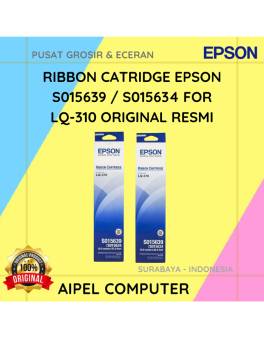
17%
A. DESKRIPSI (DESCRIPTION) EPSON S015639 / S015634 For LQ-310 Original 100% adalah cartridge ribbon berkualitas yang dirancang untuk memberikan hasil… selengkapnya
Rp 62.000 Rp 75.000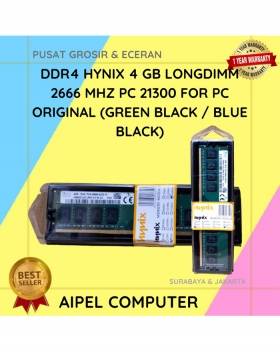
7%
A. DESKRIPSI (DESCRIPTION) DDR4 HYNIX 4 GB Longdimm 2666 MHz PC 21300 For PC Original adalah memori berkualitas tinggi yang… selengkapnya
Rp 513.500 Rp 550.000



Saat ini belum tersedia komentar.