- Orderan dibawah 500.00 via Goshop / Offline / Marketplace
Laptop Camera Not Detected or Showing Black Screen? Causes and Fixes
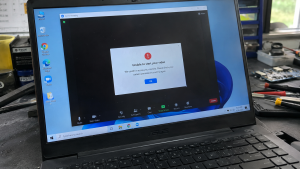
Have you ever prepared to join an important Zoom meeting, Google Meet session, or video call, only to discover a pitch-black preview screen (black screen) or an error stating “We can’t find your camera (0xA00F4244)”?
Dealing with an unreadable internal webcam is a seemingly “minor” issue that frustrates laptop users constantly. However, much like troubleshooting wireless connection glitches in laptop cant connect to wi fi or hotspot fixes, a non-working laptop camera is rarely caused by a broken camera lens. It is typically triggered by a closed physical privacy shutter, a locked Fn privacy hotkey, or Windows app permission blocks.
Featured Snippet (Quick Answer):
Primary causes of a laptop camera showing a black screen or not being detected include a closed physical privacy shutter slider, locked camera privacy hotkeys (Fn), disabled Windows Camera Privacy Settings, or crashed Integrated Camera drivers.
Checklist: Diagnosing Laptop Webcam Behavior
Check the boxes below if these camera symptoms match your current situation:
-
[ ] Small LED indicator light beside the camera turns on, but the video preview remains completely black.
-
[ ] Error messages display “No Camera Attached” or error codes
0xA00F4244 / 0x200F4244when launching the Camera app. -
[ ] Camera works properly in standalone apps (like Zoom), but renders a black screen in web browsers like Google Meet.
-
[ ] Webcam stopped working immediately following a recent Windows 11/10 system update.
-
[ ] Small plastic slider on the top screen bezel displays a red dot or line (indicating a physical lock).
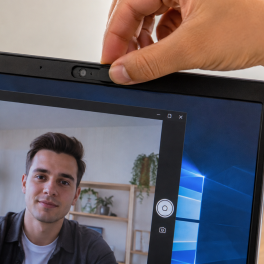
Practical Recommendation: Do not assume your webcam hardware is defective. Inspect the top screen bezel of your laptop. Many modern laptops (such as Lenovo, HP, ASUS) feature a physical Privacy Shutter slider or a side-mounted Camera E-Shutter Switch designed to physically block the lens for privacy.
Comparison Table: Camera Symptoms and Recommended Actions
| Camera Symptom | Underlying Cause | Device Damage Risk | Recommended Action |
|---|---|---|---|
| Solid Black Screen (LED On) | Closed Privacy Shutter / denied permissions | Camera access blocked | Open physical slider / grant app permissions in Settings |
| “No Camera Attached” Error | Fn privacy hotkey / disabled Integrated Camera driver | OS cannot detect camera | Press Fn hotkey / enable driver in Device Manager |
| Blurry or Distorted Video | Dirty lens / pinched camera ribbon cable | Video signal interference | Clean lens / inspect hinge flex cable routing |
| Black Screen in Browser Only | Site permissions blocked in browser | Web page access denied | Grant camera access in browser Site Settings |
4 Ways to Fix an Undetected Laptop Camera and Black Screen
-
Open Physical Privacy Shutter & Press Camera Hotkeys. Inspect the slider above the lens. If you see a red/orange dot, slide it open. If no slider exists, press the designated camera hotkey for your laptop brand:
-
Lenovo: Press
Fn + F8or toggle the side-mounted E-Shutter switch. -
ASUS: Press
Fn + F10or the key with a camera icon. -
MSI: Press
Fn + F6. -
HP / Dell: Press the camera key located on the F1-F12 row.
-
-
Enable Camera Permissions in Windows Settings. Open Settings > Privacy & security > Camera. Ensure the Camera access toggle is set to ON. Scroll down and ensure both Let apps access your camera and Let desktop apps access your camera are toggled ON.
-
Enable & Reinstall Integrated Camera Drivers. Open Device Manager > expand Cameras (or Integrated Camera / USB Video Device). If a down arrow appears on the camera icon, right-click and select Enable device. If errors persist, right-click > select Uninstall device, then restart your laptop to let Windows reinstall a clean driver.
-
Disable Privacy Modes in Vendor Management Apps. Open your laptop’s bundled control software. On Lenovo Vantage, navigate to Display & Camera > turn off Camera Privacy Mode. On MyASUS, navigate to Customization > ensure camera privacy features are not blocking the lens feed.
When to Seek Professional Repair Services
If you have enabled all privacy permissions and reinstalled drivers yet the Cameras category remains missing from Device Manager entirely (even after selecting Scan for hardware changes), the internal camera ribbon cable running through the hinge is likely severed or unseated.
This condition requires inspecting internal hinge ribbon cables or replacing the webcam module by a qualified repair technician to restore normal video calling functionality.
FAQ (Frequently Asked Questions)
Why is my laptop camera preview black even though the indicator light is on?
This is typically caused by a closed physical Privacy Shutter slider blocking the lens, or vendor privacy software (like Lenovo Vantage) suppressing video capture while power still flows to the camera module.
Can I upgrade my laptop’s internal webcam for better picture quality?
While possible, the most cost-effective solution without opening the screen assembly is plugging a high-definition external USB Webcam into a USB port.
Conclusion
An undetected laptop camera or black screen preview is usually caused by closed physical privacy shutters, Windows privacy permission blocks, or locked Fn toggle keys. By auditing physical switches and granting driver permissions, your laptop webcam can resume crisp video feeds.
Shop External Webcam, Accessories & Repairs at Aipel Computer
Looking for genuine replacement internal laptop webcam modules, high-definition external USB webcams, or official warranty-backed flex cable repair services? Find trusted hardware replacement parts and expert repair services directly at Aipel Computer.
For spare parts inquiries, replacement webcams, or technical repair consultations, visit the official Aipel Computer website today.
Tags: fix webcam showing black screen, laptop camera not detected black screen fix, replace laptop webcam surabaya, we cant find your camera 0xa00f4244 fix

Laptop Camera Not Detected or Showing Black Screen? Causes and Fixes
Saat membuka aplikasi Zoom, Google Meet, atau Camera bawaan Windows, tiba tiba muncul notifikasi error seperti We Can’t Find Your... selengkapnya
Resting your wrists on an aluminum laptop while typing only to feel a sudden prickling electric shock is startling. This... selengkapnya

Seiring dengan berkembangnya teknologi saat ini, komputer desktop atau PC pun juga mengalami banyak perkembangan. Di toko komputer banyak tersedia... selengkapnya

Peran komputer dalam dunia modern sangatlah besar. Hampir semua aktivitas saat ini sangat bergantung pada teknologi ini. Berkembangnya inovasi telah... selengkapnya
Sudah banyak tersedia di toko atau grosir komputer, WiFi repeater ternyata punya peran penting sekarang ini. Bekerja atau mengoperasikan komputer,... selengkapnya

Working on an important task, attending an online meeting, or playing a game when suddenly your laptop completely cuts power... selengkapnya

Ketika membeli komputer di toko komputer terbaik dan terpercaya, pastinya bisa mendapatkan produk berkualitas. Akan tetapi, seiring berjalannya waktu, komputer... selengkapnya
Mengunjungi pusat grosir komputer bisa menjadi pilihan untuk mendapatkan beragam komponen komputer dengan harga yang murah dengan banyak pilihan. Salah... selengkapnya
Fungsi LAN card curi perhatian siapa saja, terlebih lagi bagi pengguna komputer. Hal ini karena LAN card termasuk salah satu... selengkapnya

Harga komputer gaming tentunya akan tergantung dengan spesifikasi yang komputer tersebut miliki. Untuk para gamers, tentu saja membutuhkan komputer yang... selengkapnya
8%
AIPEL COMPUTER – Pusat Grosir dan Eceran – Belanja Hebat dan Hemat – Harga Murah Garansi Prima * GARANSI –… selengkapnya
Rp 240.000 Rp 260.000
7%
A. DESKRIPSI (DESCRIPTION) Canon GI-790C adalah refill ink berkualitas tinggi dalam warna cyan yang dirancang khusus untuk printer Canon. Dengan… selengkapnya
Rp 102.000 Rp 110.000
19%
A. DESKRIPSI (DESCRIPTION) ACER192375517PLNKP adalah adaptor laptop yang dirancang khusus untuk perangkat Acer, dengan spesifikasi daya 19V dan arus 2.37A…. selengkapnya
Rp 65.000 Rp 80.000
4%
A. DESKRIPSI (DESCRIPTION) Printer EPSON L1250 WiFi Print Original 100 % (Black – 003 CMYK) adalah printer nirkabel yang menggabungkan… selengkapnya
Rp 2.110.000 Rp 2.200.000
25%
A. DESKRIPSI (DESCRIPTION) USB HUB 7 Port 7 Switch USB 3.0 (Blue/White) adalah USB hub dengan 7 port yang dilengkapi… selengkapnya
Rp 40.000 Rp 53.000
11%
A. DESKRIPSI (DESCRIPTION) Power Supply Unit E-SMILE 500 W adalah pilihan tepat bagi Anda yang menginginkan kestabilan daya dan performa… selengkapnya
Rp 102.500 Rp 115.000
21%
A. DESKRIPSI (DESCRIPTION) Adaptor Monitor LG 19V 1.3A Colok Langsung (Black) adalah perangkat penyuplai daya kompak yang cocok untuk kebutuhan… selengkapnya
Rp 75.000 Rp 95.000
50%
A. DESKRIPSI (DESCRIPTION) Packing Plastic Clip BEST 9*16 CM (Colours) adalah klip plastik serbaguna berukuran 9×16 cm yang dirancang untuk… selengkapnya
Rp 500 Rp 1.000
18%
A. DESKRIPSI (DESCRIPTION) Cable USB M To Type-C 3 In 1 GENAI GL-Q03 adalah kabel multifungsi dengan panjang ekstra 2… selengkapnya
Rp 60.000 Rp 73.000
30%
A. DESKRIPSI (DESCRIPTION) Screwdriver 21 in 1 Palu atau Kunci Sok 2 (Red / Yellow) adalah toolkit multifungsi yang memadukan… selengkapnya
Rp 14.000 Rp 20.000



Saat ini belum tersedia komentar.