- Orderan dibawah 500.00 via Goshop / Offline / Marketplace
Laptop Screen Flickering and Lines on Display? Causes and Fixes
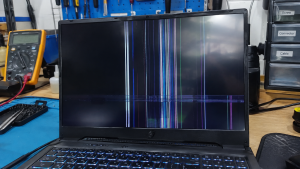
Have you ever been working or watching a movie on your laptop when the screen suddenly starts flickering, blinking intermittently, or showing distorted horizontal or vertical lines across the display?
Visual glitches on a laptop monitor often lead users to worry that their display panel is completely broken. However, much like troubleshooting display signal issues on laptop hdmi cable not connecting to tv causes fixes, screen lines and flickering are not always caused by a damaged LED panel. They can also be triggered by loose internal ribbon cables, refresh rate mismatches, or corrupted graphics drivers.
Featured Snippet (Quick Answer):
Common causes of laptop screen flickering and lines include a loose or pinched display ribbon cable (EDP/LVDS cable) inside the hinge, corrupted graphics drivers, incompatible refresh rate settings, or physical damage to the LCD/LED panel circuitry.
Checklist: Diagnosing Laptop Screen Display Issues
Check the boxes below if these screen symptoms match your current situation:
-
[ ] Screen blinks or flickers specifically when you tilt or adjust the laptop lid angle.
-
[ ] Horizontal or vertical lines multiply when the laptop runs hot or handles heavy graphics applications.
-
[ ] Lines briefly disappear when gently pressing around the edges of the screen bezel.
-
[ ] Display output appears completely clear and normal when connected to an external monitor or TV via HDMI.
-
[ ] Screen flickering worsened immediately after a recent Windows update or GPU driver installation.
Practical Recommendation: Avoid pressing firmly against a line-damaged screen panel with your fingers. Perform a quick diagnostic test by plugging your laptop into an external TV or monitor using an HDMI cable. If the external display shows a clean picture without lines, your laptop’s GPU is healthy, and the issue lies strictly within the display panel or internal video cable.
Comparison Table: Screen Symptoms and Recommended Actions
| Display Symptom | Underlying Cause | Impact on System | Recommended Action |
|---|---|---|---|
| Lines / Flickering When Lid Moves | Loose or pinched EDP ribbon cable | Display signal may cut out entirely | Inspect hinge & reseat EDP cable socket |
| Random Screen Flickering | Corrupted GPU driver / wrong refresh rate | Eye strain & visual discomfort | Update/rollback VGA driver & adjust refresh rate |
| Permanent Lines Multiplying | Failed LED panel gate driver circuit | Lines cannot be fixed via software | Replace laptop LCD/LED display panel |
| Dark Screen / Solid White Lines | Dirty video connector / bad panel power | Unusable visual display | Clean EDP video connector with contact cleaner |
4 Ways to Fix Laptop Screen Flickering and Lines
-
Adjust Display Refresh Rate Settings. Go to Settings > System > Display > Advanced display. Under Choose a refresh rate, change the value (e.g., from 144Hz down to 60Hz or vice versa). Re-aligning refresh rates often stops subtle LED panel flickering immediately.
-
Roll Back or Reinstall Graphics Drivers (GPU). Open Device Manager > expand Display adapters > right-click your graphics card (Intel UHD, AMD Radeon, or NVIDIA) > select Update driver. If flickering began after an update, select Properties > Driver tab > click Roll Back Driver.
-
Gently Move the Lid to Test the Video Cable. Slowly adjust the laptop lid angle back and forth while watching the lines. If the lines flicker or vanish as the hinge moves, the video ribbon cable (EDP cable) running through the hinge is either pinched or unseated.
-
Run an External Monitor Test. Connect an HDMI cable from your laptop to an external TV or monitor. If the external display renders a clear image without any lines, your motherboard’s GPU is functioning normally, confirming the issue is isolated to the laptop screen or ribbon cable.
When to Seek Professional Repair Services
If you have updated your graphics drivers and the lines remain permanently visible (even on the BIOS setup screen before Windows boots), the LCD/LED panel has suffered physical circuit failure within its pixel matrix.
This condition requires installing a new original replacement LCD/LED screen panel or repairing the internal display ribbon cable by a qualified repair technician to restore crisp, flicker-free visuals.
FAQ (Frequently Asked Questions)
Can a line-damaged laptop screen fix itself via software?
No, if the lines are caused by physical circuit failure inside the LED panel matrix. Software tweaks can only resolve flickering caused by driver errors or refresh rate mismatches.
How long does it take to replace a damaged laptop screen?
Replacing a laptop LCD/LED screen panel typically takes about 30 to 60 minutes if a compatible replacement screen with matching size and pin configuration is in stock.
Conclusion
Laptop screen flickering and display lines can stem from software issues like corrupted GPU drivers or hardware faults like pinched display ribbon cables. Using an external monitor test will help you determine whether the issue is driven by your graphics card or a damaged screen panel.
Shop OEM Laptop Screens, Video Cables & Repairs at Aipel Computer
Need an original LCD/LED replacement screen, EDP video ribbon cables, or expert laptop display repair services with an official warranty? Find genuine replacement parts and reliable repair services directly at Aipel Computer.
For replacement screen availability or technical inquiries, visit the official Aipel Computer website today.
Tags: causes of lines on laptop screen, fix laptop screen blinking, laptop screen flickering and lines on display

Laptop Screen Flickering and Lines on Display? Causes and Fixes
Mengatasi komputer black screen sebenarnya tidak terlalu sulit jika Anda mengetahui penyebabnya. Ketika komputer mengalami black screen, terutama saat Anda... selengkapnya
Saat kamu mencolokkan headset atau earphone ke laptop di ruang publik atau kantor, terkadang suara tetap keluar dari speaker internal.... selengkapnya
Kondisi laptop yang mendadak mengeluarkan suara dengungan kipas sangat kencang sering kali memicu kepanikan. Udara panas mendadak menyembur dari ventilasi... selengkapnya

Di era yang serba canggih seperti saat ini menjadi salah satu pembuka peluang bisnis dalam berbagai macam bidang. Salah satunya... selengkapnya

Headset microphone merupakan perangkat audio khusus untuk dipasang di kepala lengkap dengan fitur microphone. Headset ini memungkinkan pengguna mendengarkan audio... selengkapnya
Meskipun sekarang sudah banyak laptop atau komputer portabel yang semakin canggih, namun penggunaan komputer konvensional atau biasa disebut dengan pc... selengkapnya
HDMI extender dapat membantu memperpanjang jarak kabel HDMI dengan efektif. Biasanya, extender ini dihubungkan ke ujung kabel HDMI dan dapat... selengkapnya
Cara ngeprint di komputer sendiri sangatlah mudah, simpel, dan tidak memakan waktu yang lama. Bisa mencetak berbagai dokumen sendiri baik... selengkapnya
Having your laptop fan suddenly roar at maximum speed can be unsettling. Hot air rushes from the exhaust vents, the... selengkapnya
Penyebab backlight laptop mati bisa beragam. Di bawah ini kita akan membahas beberapa faktor penyebab dan cara mengatasinya. Backlight sendiri... selengkapnya

40%
AIPEL COMPUTER – Pusat Grosir dan Eceran – Belanja Hebat dan Hemat – Harga Murah Garansi Prima * GARANSI –… selengkapnya
Rp 9.000 Rp 15.000
8%
A. DESKRIPSI (DESCRIPTION) Adaptor Laptop LENOVO 19.5V 6.15A DC (5.5*2.5) Panjang Slim Kabel Power adalah pilihan ideal bagi Anda yang… selengkapnya
Rp 165.000 Rp 180.000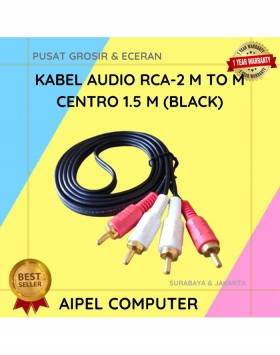
21%
A. DESKRIPSI (DESCRIPTION) Kabel Audio RCA-2 M to M CENTROO 1.5M adalah solusi sempurna untuk Anda yang menginginkan koneksi suara… selengkapnya
Rp 11.000 Rp 14.000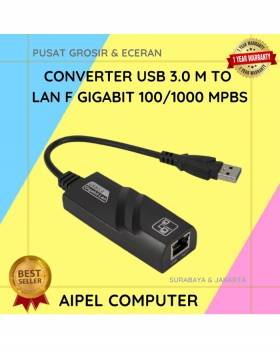
29%
A. DESKRIPSI (DESCRIPTION) Converter USB 3.0 to LAN CENTROO 100/1000 Mbps Gigabit – Not Real (Black) adalah perangkat converter jaringan… selengkapnya
Rp 28.348 Rp 40.000
22%
A. DESKRIPSI (DESCRIPTION) Kabel Audio 3.5 M to RCA-2 M CENTROO 5M adalah pilihan sempurna untuk menghubungkan perangkat audio seperti… selengkapnya
Rp 18.000 Rp 23.000
14%
A. DESKRIPSI (DESCRIPTION) Kabel HDTV Standard M to M CENTROO 15 M 4K (Box) adalah kabel HDMI premium dari CENTROO… selengkapnya
Rp 120.000 Rp 140.000
19%
A. DESKRIPSI (DESCRIPTION) Kabel Audio Optical CENTROO 5 M OD 5.0 Toslink adalah solusi praktis dan canggih untuk Anda yang… selengkapnya
Rp 65.000 Rp 80.000
24%
A. DESKRIPSI (DESCRIPTION) Keyboard Wired USB BANDA Mini Multi Media adalah keyboard praktis berdesain minimalis yang dirancang untuk memberikan kenyamanan… selengkapnya
Rp 38.000 Rp 50.000
26%
A. DESKRIPSI (DESCRIPTION) Cable USB to Lightning GENAI GL-Q36 LED Fast Charging (Black) adalah kabel pengisian canggih untuk perangkat Apple… selengkapnya
Rp 42.000 Rp 57.000
4%
A. DESKRIPSI (DESCRIPTION) Printer EPSON L1250 WiFi Print Original 100 % (Black – 003 CMYK) adalah printer nirkabel yang menggabungkan… selengkapnya
Rp 2.110.000 Rp 2.200.000



Saat ini belum tersedia komentar.