- Orderan dibawah 500.00 via Goshop / Offline / Marketplace
Laptop Hinge Broken, Stiff, or Cracked? Causes and Fixes
Have you ever gone to open your laptop lid as usual, only to hear a startling snapping sound followed by the plastic casing near the hinge separating, cracking, or even tearing completely open?
A broken, stiff, or seized laptop screen hinge represents one of the most feared mechanical hardware failures among users. However, much like troubleshooting external peripheral dropouts in laptop usb port not working loose causes fixes, hinge damage does not happen instantaneously. This condition typically originates from neglected hinge shaft stiffness over time, which exerts extreme torque pressure against the brass threaded inserts embedded inside the laptop’s plastic body shell.
Featured Snippet (Quick Answer):
Primary causes of a broken or stiff laptop hinge include unlubricated rusted hinge shafts, the habit of opening the laptop screen from a single side corner, or brass inserts pulling away from plastic chassis housings due to drops and thermal stress.
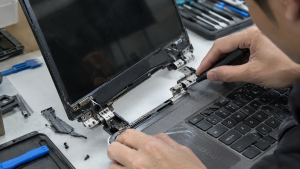
Checklist: Evaluating Laptop Hinge Damage Severity
Check the boxes below if these hinge symptoms match your current situation:
-
[ ] The laptop body casing near the screen corners appears warped, elevated, or cracked when opening the lid.
-
[ ] The hinge shafts feel excessively heavy, tight, or rigid (stiff) when moving the screen open or closed.
-
[ ] Tiny plastic shards fall out from the hinge gap whenever the laptop lid is adjusted.
-
[ ] Internal display ribbon cables or Wi-Fi antennas look pinched, strained, or exposed due to hinge separation.
-
[ ] The laptop was previously dropped or impacted while the screen lid was open.
Practical Recommendation: DO NOT FORCE IT OPEN OR CLOSED! If the hinge feels exceptionally stiff and the plastic chassis begins separating, forcing the lid shut will shear internal display ribbon cables, snap antenna wires, and shatter the nearby LCD panel. Bring it to a technician immediately to loosen the hinge mechanism.
Comparison Table: Hinge Damage Types and Recommended Actions
| Hinge Damage Condition | Underlying Cause | Damage Risk | Recommended Action |
|---|---|---|---|
| Stiff / Seized Hinge Shaft | Rusted metal shaft / lack of lubrication | Brass inserts rip out from plastic shell | Loosen hinge shaft nuts & apply specialized lubricant |
| Cracked / Separating Plastic Shell | Excessive hinge torque pressure on thin body | Structural casing & ribbon cable damage | Rebuild chassis housing using resin / acrylic reinforcement |
| Completely Broken / Detached Hinge | Severe impact or sheared mounting screws | Unstable, wobbly screen assembly | Replace damaged chassis housing (palmrest / back cover) |
| Loose / Wobbly Screen Assembly | Loose internal hinge tightening screws | Internal cables pulled and severed | Disassemble chassis & tighten hinge locking screws |
4 Emergency Steps to Handle Problematic Laptop Hinges
-
Support the Screen Carefully When Opening. If your hinges start feeling slightly stiff, get into the habit of opening your laptop screen precisely from the center of the top bezel frame (rather than pulling from the left or right corners) to distribute weight evenly across both hinge shafts.
-
Never Leave a Damaged Laptop Open Indefinitely. If the chassis shell has started cracking or lifting, loosen the hinge gripping tension before it worsens. Ignoring it will cause brass inserts to detach entirely, destroying internal components.
-
Repair Torn Threaded Inserts with Resin / Strong Plastics. Professional technicians typically re-anchor loose brass inserts back into plastic housings using a combination of multi-purpose adhesives and acrylic reinforcing powder to restore structural integrity.
-
Perform Hinge Tension Adjustment. Slightly loosen the locking nuts on the metal hinge shafts using a mini wrench or needle-nose pliers if the shaft is overly seized, then apply a drop of silicone lubricant to restore smooth, effortless movement.
When to Seek Professional Repair Services
If the LCD back cover shell or upper keyboard palmrest chassis has shattered completely around the hinge mounting brackets, DIY home gluing will fail to withstand the heavy mechanical torque of opening and closing the screen.
This condition requires replacing an entire new chassis housing set (casing replacement) or performing professional body structure restoration by an experienced technician to ensure safe operation.
FAQ (Frequently Asked Questions)
Why do laptop hinges become extremely stiff all of a sudden?
Over time, dust, friction, and a lack of lubrication on the metal hinge shafts cause oxidation and binding. When forced open, the excessive rotational torque immediately shatters the plastic nut mounts inside the chassis shell.
Does standard manufacturer warranty cover broken laptop hinges?
Most laptop manufacturers classify hinge damage resulting from physical pressure or drops as human error outside standard warranties, unless proven to be a factory defect in mounting design.
Conclusion
A broken, stiff, or cracked laptop screen hinge is a severe mechanical issue requiring prompt attention to prevent secondary damage to display ribbon cables and LCD panels. Maintaining gentle opening habits and readjusting hinge tension will protect your device from catastrophic failure.
Shop OEM Chassis Housing, Hinges & Repairs at Aipel Computer
Looking for genuine original replacement laptop chassis casings with warranty, professional hinge repair services, or expert laptop servicing in Surabaya? Find trusted replacement parts and expert repair services directly at Aipel Computer.
Tags: fix cracked laptop screen bezel hinge mount, laptop hinge broken stiff cracked causes fixes, laptop hinge repair surabaya, laptop repair surabaya, replace laptop casing surabaya

Laptop Hinge Broken, Stiff, or Cracked? Causes and Fixes

Mempunyai budget terbatas, dan saat ini sedang mencari toko komputer murah terdekat. Maka ini akan jadi ulasan yang tepat untuk... selengkapnya
Berikut adalah cara membersihkan keyboard komputer yang aman dan mudah dilakukan sendiri di rumah. Anda hanya memerlukan alat dan bahan... selengkapnya

Tips memilih microphone wireless menjadi penting untuk Anda ketahui agar tidak salah beli nantinya. Microphone wireless merupakan salah satu jenis... selengkapnya
Printer ribbon cartridge tetap menjadi pilihan yang unggul dalam berbagai aplikasi spesifik meskipun teknologi inkjet dan laserjet mendominasi pasar. Di... selengkapnya
Untuk mengoptimalkan kinerja sistem, salah satu langkah efektif adalah dengan menghilangkan bloatware di Windows 10. Aplikasi bawaan yang tidak terpakai... selengkapnya

Ingin beli PC? Bingung harus ke pusat komputer terdekat atau belanja secara online? Bagi yang merasa kesulitan, tidak ada salahnya... selengkapnya
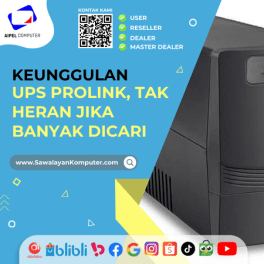
Perlu kamu ketahui, UPS Prolink ini menjadi sebuah produk yang cukup populer dan dinilai mempunyai banyak keunggulan. Sehingga, tak heran... selengkapnya
Ketika menggunakan laptop, sinyal WiFi yang kuat sangat penting untuk memastikan koneksi internet yang cepat dan stabil. Namun, sering kali... selengkapnya

Toko komputer baik online maupun offline juga menyediakan berbagai aksesoris komputer maupun laptop yang penting dan berguna. Salah satu aksesorisnya... selengkapnya
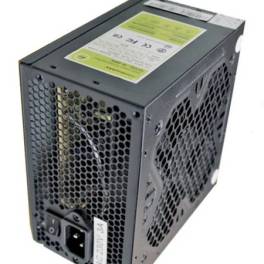
Tips memilih power supply di grosir komputer berikut ini cukup penting karena membantu menemukan power supply terbaik untuk PC atau... selengkapnya
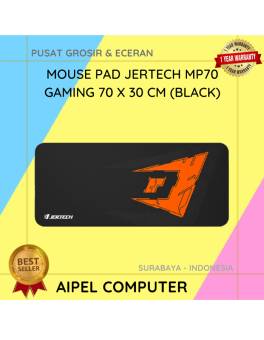
23%
A. DESKRIPSI (DESCRIPTION) Mouse Pad JERTECH MP70 Gaming adalah alas mouse dengan ukuran luas dan permukaan premium yang dirancang khusus… selengkapnya
Rp 41.500 Rp 54.000
4%
A. DESKRIPSI (DESCRIPTION) Kabel LAN WEBSONG 50 Meter merupakan salah satu inovasi unggulan dari WEBSONG yang hadir untuk menjawab kebutuhan… selengkapnya
Rp 110.000 Rp 115.000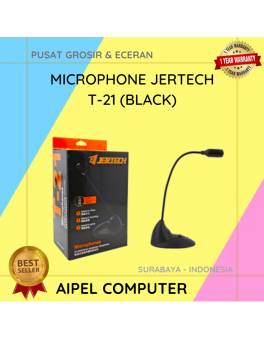
18%
A. DESKRIPSI (DESCRIPTION) Microphone JERTECH T21 Original 100 % adalah pilihan ideal untuk kamu yang menginginkan kualitas suara jernih dalam… selengkapnya
Rp 59.840 Rp 73.000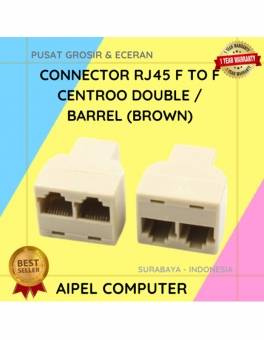
38%
A. DESKRIPSI (DESCRIPTION) Connector RJ45 F To F CENTROO Double / Barrel (Brown) adalah solusi praktis bagi Anda yang memerlukan… selengkapnya
Rp 2.500 Rp 4.000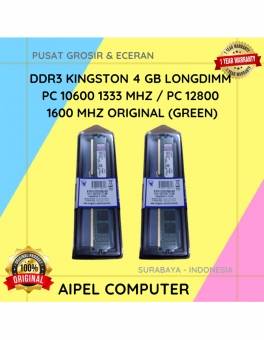
18%
A. DESKRIPSI (DESCRIPTION) DDR3 KINGSTON 4 GB adalah solusi tepat bagi Anda yang mendambakan performa sistem lebih tinggi untuk menjalankan… selengkapnya
Rp 70.000 Rp 85.000
25%
A. DESKRIPSI (DESCRIPTION) Mouse Pad CENTROO Logo None 26 x 21 CM adalah pilihan sempurna untuk pengguna komputer dan laptop… selengkapnya
Rp 9.000 Rp 12.000
10%
A. DESKRIPSI (DESCRIPTION) GENAI G5 Earbuds adalah earphone wireless tipe TWS G5 yang memadukan desain ergonomis dan teknologi audio canggih,… selengkapnya
Rp 129.000 Rp 144.000
22%
A. DESKRIPSI (DESCRIPTION) Kabel Audio 3.5 M to RCA-2 M CENTROO 5M adalah pilihan sempurna untuk menghubungkan perangkat audio seperti… selengkapnya
Rp 18.000 Rp 23.000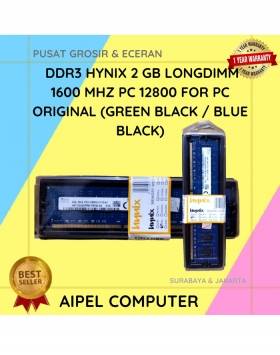
19%
A. DESKRIPSI (DESCRIPTION) DDR3 HYNIX 2GB Longdimm 1600 MHz PC 12800 adalah memori RAM yang dirancang untuk menghadirkan performa stabil… selengkapnya
Rp 65.000 Rp 80.000
17%
A. DESKRIPSI (DESCRIPTION) Car Charger USB + Type-C GENAI GC-C12 PD adalah pengisi daya mobil berteknologi tinggi yang menggabungkan kekuatan… selengkapnya
Rp 69.000 Rp 83.000



Saat ini belum tersedia komentar.