- Orderan dibawah 500.00 via Goshop / Offline / Marketplace
Laptop Touchpad Not Working? Here Is How to Fix It Easily
Experiencing a situation where the cursor on your laptop screen suddenly freezes and refuses to move will instantly halt your entire work productivity. The issue of a laptop touchpad not working is one of the most common hardware input problems that frequently cause users to panic. Many people immediately assume that their touch sensor component is completely broken and must be replaced with a new one. Yet in many simple cases, this issue is often just triggered by accidentally pressing a lock key or a temporary glitch within the operating system.
If you previously experienced internet connection issues while working, you can read the helpful guide on how to fix a dropping wifi connection to make sure the trouble is not part of a wider system malfunction. However, if the main trouble you are facing is strictly related to screen navigation, let us check a few basic settings first so you can find the right solution independently.
Featured Snippet (Instant Answer):
To fix a laptop touchpad that is not working, press the hardware activation shortcut key (usually Fn + F-key with a touchpad icon), ensure Touchpad is toggled ON in Windows Settings, or update the pointing device driver via Device Manager if a recent system update caused an incompatibility glitch.
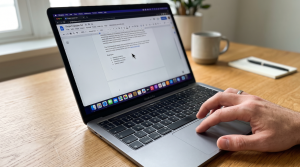
Checklist: Why Is Your Laptop Touch Sensor Suddenly Frozen?
Tick the boxes below if you are experiencing any of these common software, environmental, or hardware factors:
-
[ ] The touchpad toggle shortcut key was accidentally pressed on your keyboard row while typing fast.
-
[ ] The touchpad feature was automatically turned off by the operating system following a Windows update.
-
[ ] The pointing device driver file is outdated, corrupted, or missing altogether in Device Manager.
-
[ ] The touch sensor surface appears dirty, greasy, or damp due to accidental liquid exposure.
-
[ ] Your laptop recently suffered a physical bump that might have loosened the internal ribbon connector cable.
Our Recommendation: If your cursor moves smoothly when you plug in an external USB mouse, your operating system is running fine. The issue is strictly isolated to your touchpad hardware lock or internal driver communication.
Data Benchmark: Identifying Cursor Glitches by System Behavior
To help you identify the exact source of your navigation issues, here is a comparison of common cursor behaviors and their solutions:
| Cursor Symptom on Screen | Likely Root Cause | Required Action | Real-World Impact on Device |
|---|---|---|---|
| Completely frozen from boot | Feature disabled via Fn key or Settings | Minor software tweak | Cursor reactivates immediately once toggled back ON |
| Jumps around or responds erratically | Outdated driver or dirty surface sensor | Surface cleaning & driver update | Restores smooth and accurate tracking sensitivity |
| Remains dead even when mouse is unplugged | Loose internal cable or swelling battery | Hardware physical inspection | Requires technician evaluation to inspect internal wiring |
How to Fix a Laptop Touchpad That Is Not Working
Do not worry, you do not need to panic and rush into dismantling your laptop chassis by yourself. Here are a few ways to fix a broken laptop touchpad that you can try right away:
-
Check the Function Activation Key on the Keyboard. Most laptop manufacturers provide a dedicated shortcut key to disable the touch panel for convenience when typing long documents so the cursor does not shift. This key is usually located on the F1 through F12 row and is marked with a small square icon. Try pressing that specific key along with the Fn key to activate the touch sensor that was accidentally locked.
-
Enable the Component Through Windows Settings. If the hardware shortcut key does not yield any results, you can check the device status through the internal system. Use the help of an external mouse to go into the Windows settings menu, select the devices option, and look for the touchpad section. Make sure the main toggle switch is set to the active position, because sometimes automatic operating system updates can turn this setting off unexpectedly.
-
Update the Touchpad Driver on the Laptop. An outdated or corrupted device driver file is very often the main culprit behind a cursor that jumps around wildly or freezes completely. Open the Device Manager on your computer, then look for the mice and other pointing devices category. Right-click on your touchpad component name and select the update driver option to download the latest software version from the internet.
How to Recognize Signs of Physical Hardware Damage?
If you have applied all the alternative system fixes above but the cursor still remains completely motionless, there is a high probability that the issue lies within the hardware itself.
You should start suspecting physical damage if the touch panel area feels unusually hot while the laptop is turned on. Another common physical indicator is when the touchpad surface looks slightly lifted or warped due to pressure from an internal battery that has started to swell. If the outer body structure has undergone this kind of shape distortion, the internal sensor will automatically become jammed and lose its ability to detect your finger movements normally.
FAQ (Frequently Asked Questions)
-
Why does my laptop touchpad stop working right after a system update?
This situation usually happens because the new operating system files are incompatible with the older driver version of the touch panel, causing the system to fail when sending operational commands to the hardware.
-
Does a frozen cursor always mean the touch panel is physically broken?
Not necessarily, because a frozen cursor can also be triggered by a complete operating system crash or a heavy RAM workload that makes the laptop respond to commands very slowly.
-
What is the safest way to clean a laptop touch panel?
You can use a slightly damp microfiber cloth without any harsh chemical liquids to wipe the surface gently while the laptop device is completely turned off.
Conclusion
With the right troubleshooting steps, most touchpad issues can be resolved quickly without professional help. However, ignoring physical damage indicators like a swollen battery can lead to severe damage to your keyboard or motherboard. Seeking expert assistance is always the safest choice to ensure an accurate diagnosis without guessing.
Visit the Aipel Computer Physical Store
If your touchpad issues turn out to be caused by a loose ribbon cable or swelling internal battery, let our technical team inspect your device safely. We offer quick hardware diagnostics and reliable component replacements.
For step-by-step driving routes, opening hours, or to consult with our technician team, feel free to visit our main website at Aipel Computer in Surabaya for prompt and reliable service!
Tags: computer store surabaya, fix broken touchpad, frozen laptop cursor, laptop navigation tips, laptop service surabaya, laptop touchpad not working

Laptop Touchpad Not Working? Here Is How to Fix It Easily
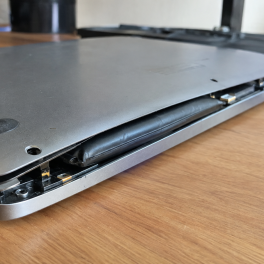
Finding your laptop trackpad stiff to click, raised above the palm rest, or noticing the bottom casing bulging so the... selengkapnya

Sebenarnya apa saja fungsi router itu? Router menjadi salah satu perangkat yang sudah banyak digunakan di zaman modern ini. Router... selengkapnya
Selama menentukan toko grosir PC tentu tidak boleh memilih sembarangan karena pemilihan toko yang tepat nantinya akan menentukan kualitas sekaligus... selengkapnya
Casing hardisk external adalah aksesoris penting yang sering diabaikan oleh banyak pengguna komputer. Padahal, casing ini tidak hanya melindungi hardisk... selengkapnya
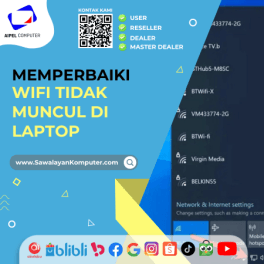
Masalah WiFi tidak muncul di laptop bisa saja terjadi. Hal ini tentu akan sangat membingungkan para pengguna. Sebab, WiFi memang... selengkapnya
Mouse komputer menjadi aksesoris pendukung yang penting dimiliki. Meskipun demikian, seringkali orang-orang cenderung tidak memperhatikan dalam memilih mouse tersebut dengan... selengkapnya

Tang crimping berfungsi untuk banyak hal dalam bidang instalasi listrik dan jaringan. Seperti menggunting, mengupas, hingga menjepit kabel berjenis Unshielded... selengkapnya
DDR5 merupakan generasi RAM terbaru yang telah diperkenalkan ke pasaran setelah melalui proses penelitian dan pengembangan yang cukup panjang. Para... selengkapnya

Splitter RCA merupakan konektor listrik yang biasa dipakai pada komponen audio. Jenis splitter ini juga bisa disebut dengan nama AV.... selengkapnya

Pada umumnya, distributor perangkat komputer profesional menyediakan bermacam produk untuk memenuhi kebutuhan setiap konsumennya. Sebut saja mulai dari hardware hingga... selengkapnya

29%
A. DESKRIPSI (DESCRIPTION) Connector Audio 3.5 M To F-2 adalah splitter audio praktis tanpa kabel dengan desain unik berbentuk huruf… selengkapnya
Rp 5.000 Rp 7.000
3%
A. DESKRIPSI (DESCRIPTION) Refill Ink EPSON 001 Yellow 70 ML Original 100 % adalah solusi tinta isi ulang berkualitas dengan… selengkapnya
Rp 117.000 Rp 120.000
26%
A. DESKRIPSI (DESCRIPTION) Kabel Power Desktop HYDRA 1.5 M (Black) adalah kabel andalan dari HYDRA yang dioptimalkan untuk memberikan suplai… selengkapnya
Rp 14.000 Rp 19.000
31%
A. DESKRIPSI (DESCRIPTION) Kabel Audio 3.5 M-2 To F BEST adalah kabel splitter audio praktis yang dirancang untuk membagi satu… selengkapnya
Rp 5.500 Rp 8.000
8%
A. DESKRIPSI (DESCRIPTION) TP-LINK DECO E4 1-PACK adalah solusi mesh WiFi pintar dari TP-LINK yang dirancang untuk memberikan koneksi internet… selengkapnya
Rp 367.000 Rp 400.000
25%
A. DESKRIPSI (DESCRIPTION) Mouse Pad CENTROO Logo Hunter 28 X 24 CM adalah pilihan sempurna untuk pengguna komputer dan laptop… selengkapnya
Rp 9.000 Rp 12.000
14%
A. DESKRIPSI (DESCRIPTION) Adaptor Laptop SONY 19.5V 4.74A DC (6.5*4.4) Panjang Kabel Power adalah perangkat pengisi daya laptop berkualitas tinggi… selengkapnya
Rp 90.000 Rp 105.000
25%
A. DESKRIPSI (DESCRIPTION) Cable Type-C M To Lightning M GENAI GL-Q27 adalah kabel berkualitas tinggi dengan panjang ekstra 200 cm… selengkapnya
Rp 51.000 Rp 68.000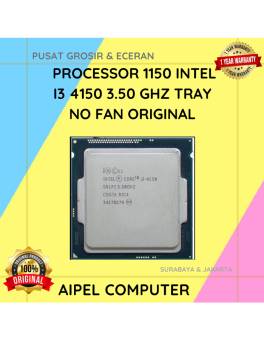
14%
A. DESKRIPSI (DESCRIPTION) Processor 1150 I3 4150 3.50 GHz Tray No Fan Original 🌟 adalah prosesor bertenaga dengan efisiensi optimal,… selengkapnya
Rp 90.000 Rp 105.000
8%
AIPEL COMPUTER – Pusat Grosir dan Eceran – Belanja Hebat dan Hemat – Harga Murah Garansi Prima * GARANSI –… selengkapnya
Rp 78.000 Rp 85.000



Saat ini belum tersedia komentar.