- Orderan dibawah 500.00 via Goshop / Offline / Marketplace
Laptop Stuck on Windows Logo & Spinning Dots? 4 Easy Fixes
Powering on your laptop as usual, only for the screen to display the manufacturer logo followed by Windows spinning loading dots that circle endlessly for hours without ever reaching the desktop, traps you in a frustrating boot loop.
A laptop stuck on the Windows logo is rarely caused by total hardware failure; it typically stems from file system corruption or a failed Windows update installation interrupted during your last shutdown. Much like diagnosing issues when your laptop stuck on boot screen how to fix to restore standard operating system functions, you can recover system boot stability yourself.
Featured Snippet (Quick Answer):
To fix a laptop stuck on the Windows logo spinning dots, force a hard restart 3 times to trigger Automatic Repair, run Startup Repair, enter Safe Mode to remove corrupted software, and run the
chkdskcommand via Command Prompt to repair bad storage sectors.
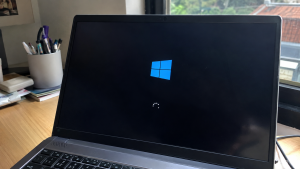
Checklist: Diagnosing Windows Boot Loop Symptoms
Check the boxes below if these conditions describe your laptop:
-
[ ] The Windows logo and spinning dots appear, but freeze completely on the exact same frame.
-
[ ] The hard drive / SSD activity indicator light on the chassis blinks irregularly or stays dead.
-
[ ] The laptop ignores keystrokes entirely (except for hard reset button combinations).
-
[ ] The boot failure started right after Windows installed automated system updates overnight.
-
[ ] External USB drives or flash drives remain plugged into USB ports.
Practical Recommendation: Unplug all external USB peripherals (mice, flash drives, external hard drives) when your laptop sticks on the boot logo, as conflicting BIOS boot order priorities often confuse Windows.
Comparison Table: Causes of Windows Boot Loops and Fixes
Here is an overview of why laptops get stuck on boot screens and recommended troubleshooting actions:
| Boot Symptom | Underlying Cause | Device Damage Risk | Recommended Action |
|---|---|---|---|
| Freezes on spinning dots | Windows file system corruption | Desktop fails to load | Enter Automatic Repair & run Startup |
| Blue screen crash (BSOD) | Incompatible hardware driver | Repeated system crashes | Enter Safe Mode & uninstall updates |
| Black screen before logo | Loose SSD / HDD cable connection | Storage drive undetected | Check physical SSD/HDD motherboard slots |
| Spinning dots > 2 hours | Bad sectors on storage drive | Data loss risk | Run chkdsk /f /r command via CMD |
4 Ways to Fix a Laptop Stuck on the Windows Logo
Follow these system recovery steps in order:
-
Unplug All USB Peripherals and Perform a Hard Reset. Shut down your laptop forcibly by holding down the Power button for 10 seconds. Disconnect all USB flash drives, mice, or cooling pads. Power the laptop back on. External device conflicts frequently trigger boot sequence hangups.
-
Trigger Automatic Repair (Hard Interrupt 3x). Power on your laptop, and the moment the Windows logo appears with spinning dots, press and hold the Power button for 5 seconds to force a shutdown. Repeat this “turn on and force shutdown during logo” cycle 3 consecutive times. On the 4th attempt, Windows will automatically launch into the Automatic Repair environment.
-
Run Startup Repair or System Restore. In the automatic repair menu, click Troubleshoot > Advanced options. Select Startup Repair to let Windows diagnose and fix corrupted boot files automatically. If unsuccessful, choose System Restore to roll back system states to a point before the error occurred.
-
Enter Safe Mode and Remove Problematic Updates. If automatic repair fails, navigate back to Advanced options > Startup Settings > click Restart, then press
4orF4to boot into Safe Mode. Inside Safe Mode, open Control Panel > Programs and Features > View installed updates, and uninstall the most recent Windows updates triggering glitches.
When to Reinstall Windows Cleanly
If all automated repair methods inside Advanced Options fail, or Command Prompt indicates that your C Drive partition has become RAW, your Windows system files are unrecoverable.
This requires performing a Clean Installation of Windows using a bootable USB installer flashdisk to wipe and restore your laptop to fresh working order.
FAQ (Frequently Asked Questions)
Will my files be lost if my laptop is stuck on the Windows logo?
Personal documents stored on separate data partitions (like Drive D or E) generally remain safe because the operating system only boots system files on Drive C. However, careless clean installs without selecting custom keep-files options can wipe Drive C data.
Why do laptops frequently get stuck after Windows updates?
Windows updates interrupted mid-installation due to sudden power loss or battery depletion often leave behind incomplete system files, triggering boot loops.
Conclusion
A laptop stuck on the Windows logo and spinning dots is usually caused by file system corruption from interrupted shutdowns. By utilizing the Automatic Repair menu, Startup Repair, or booting into Safe Mode, you can successfully recover your Windows operating system without losing your data.
Shop Windows OS Reinstallation, Data Recovery & Service at Aipel Computer
Struggling with a laptop stuck on the Windows logo, needing professional data recovery services, original Windows OS reinstallation with official warranty, or high-speed SSD upgrades? Find complete computer repair solutions at wholesale prices directly in our store.
To check product availability or get store directions, visit the official Aipel Computer website in Surabaya today.
Tags: automatic repair startup repair windows, fix windows 11 boot loop safe mode, laptop frozen on windows logo loading, laptop stuck on boot screen spinning dots

Laptop Stuck on Windows Logo & Spinning Dots? 4 Easy Fixes
Kipas laptop yang berputar kencang dan berisik seringkali menjadi masalah yang mengganggu bagi banyak pengguna. Suara bising ini bisa mengurangi... selengkapnya
Emosi langsung memuncak saat laptop yang tadinya berjalan lancar mendadak tersendat-sendat, patah-patah, dan mengalami freeze total begitu kamu membuka beberapa... selengkapnya

Jual PC rakitan murah – VGA card atau umumnya lebih dikenal sebagai kartu video yang sering sekali digunakan dalam memproses... selengkapnya
CPU komputer tidak mau menyala memang dapat menghambat pekerjaan dan sering kali membuat pengguna panik. Namun, jika CPU dibeli dari... selengkapnya

Komputer tidak bisa shutdown adalah masalah umum yang sering dihadapi oleh pengguna. Ketika komputer tidak merespon perintah shutdown, ini dapat... selengkapnya
Laptop gaming dikenal karena kinerjanya yang tinggi dan kemampuannya menjalankan game-game berat. Namun, performa yang tinggi ini sering kali menghasilkan... selengkapnya
Komputer Anda tak akan lengkap dengan aksesoris. Meskipun bukan merupakan hal yang wajib namun dalam kenyataannya terdapat fungsi dari komputer... selengkapnya
Instant frustration boils over when your freshly powered-on laptop grinds to a dead halt, spinning the dreaded loading circle endlessly... selengkapnya
Untuk memaksimalkan kinerja dan fungsi dari komputer, dibutuhkan berbagai aksesoris yang lengkap. Di Surabaya telah ada distributor aksesoris toko komputer... selengkapnya

Layar laptop terbalik tentu sangat mengganggu. Jika Anda mengalami masalah ini, berikut beberapa cara untuk mengembalikan layar laptop ke posisi... selengkapnya

40%
A. DESKRIPSI (DESCRIPTION) Cable USB M To Micro M GENAI GL-Q12 adalah kabel data dan charger cepat dari GENAI dengan… selengkapnya
Rp 12.000 Rp 20.000
9%
AIPEL COMPUTER – Pusat Grosir dan Eceran – Belanja Hebat dan Hemat – Harga Murah Garansi Prima * GARANSI –… selengkapnya
Rp 157.500 Rp 172.500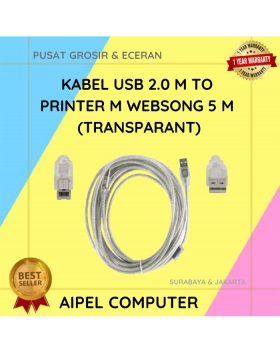
21%
A. DESKRIPSI (DESCRIPTION) Kabel USB 2.0 M to Printer WEBSONG 5 Meter (Transparant) adalah pilihan tepat bagi Anda yang mendambakan… selengkapnya
Rp 27.500 Rp 35.000
50%
A. DESKRIPSI (DESCRIPTION) Kabel Audio 3.5 mm Male to Male BEST 30–50 CM adalah kabel audio pendek yang ideal untuk… selengkapnya
Rp 1.000 Rp 2.000
33%
A. DESKRIPSI (DESCRIPTION) Kabel USB Micro BEST adalah kabel pengisian dan transfer data yang penuh warna dan gaya. 🎨⚡ Dengan… selengkapnya
Rp 4.000 Rp 6.000
18%
A. DESKRIPSI (DESCRIPTION) Adaptor Laptop ACER 19V 4.74A DC (5.5 X 1.7) adalah solusi ideal untuk mengisi daya laptop ACER… selengkapnya
Rp 70.000 Rp 85.000
6%
AIPEL COMPUTER – Pusat Grosir dan Eceran – Belanja Hebat dan Hemat – Harga Murah Garansi Prima * GARANSI –… selengkapnya
Rp 240.000 Rp 255.000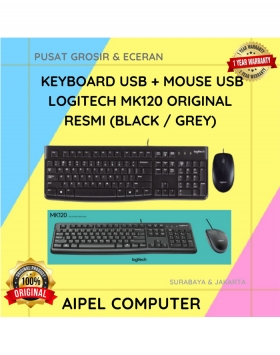
2%
A. DESKRIPSI (DESCRIPTION) Keyboard + Mouse LOGITECH MK120 adalah pilihan terbaik untuk pengguna yang membutuhkan kombinasi perangkat input yang solid… selengkapnya
Rp 162.000 Rp 165.000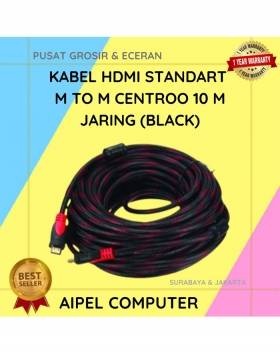
24%
A. DESKRIPSI (DESCRIPTION) Kabel HDTV Standart M to M CENTROO 10 M Jaring adalah kabel HDMI berkualitas tinggi dengan panjang… selengkapnya
Rp 42.000 Rp 55.000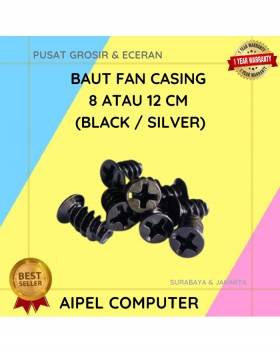
33%
A. DESKRIPSI (DESCRIPTION) Baut Fan Casing 8 CM atau 12 CM (Black / Silver) adalah sekrup khusus untuk pemasangan kipas… selengkapnya
Rp 200 Rp 300



Saat ini belum tersedia komentar.