- Orderan dibawah 500.00 via Goshop / Offline / Marketplace
Laptop Fan Suddenly Running Loud? Fix High CPU Usage in Task Manager
Having your laptop fan suddenly roar at maximum speed can be unsettling. Hot air rushes from the exhaust vents, the chassis warms up quickly, and your cursor starts stuttering even though you only have a single browser tab open or left the computer sitting idle.
A laptop fan suddenly revving at top speed is rarely caused by broken hardware bearings; it usually signals a severe processor spike (100% CPU usage). This happens when a background Windows service, a hung driver, or rogue third-party software enters a loop and demands continuous processing power. Just like diagnosing noisy laptop fan making grinding noise how to fix to distinguish physical dust from system glitches, you can quickly shut down runaway tasks yourself inside Task Manager.
Featured Snippet (Quick Answer):
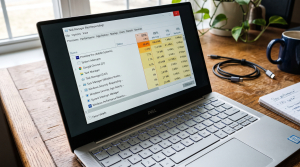
To quiet a laptop fan suddenly running loud, open Task Manager (
Ctrl + Shift + Esc), sort processes by CPU usage to identify tasks consuming over 80–90% capacity, select the runaway program and click End Task, then disable unnecessary startup applications.
Checklist: Signs of Software-Induced Fan Noise
Check the boxes below if your laptop exhibits these conditions:
-
[ ] The cooling fan suddenly spins up to top speed without running gaming software.
-
[ ] Exhaust air coming from the side vents feels uncomfortably hot.
-
[ ] Typing or moving windows starts lagging noticeably.
-
[ ] The fan quiets down immediately after restarting the laptop or closing hung programs.
-
[ ] The noise is purely high-velocity rushing air, not rattling or scraping metal.
Practical Recommendation: Avoid force-shutting down your laptop when the fan roars. Use Task Manager to kill high-CPU tasks instead.
Comparison Table: Common High-CPU Processes and Solutions
Here is an overview of common background processes that cause fans to spin at top speed:
| Process Name in Task Manager | System Role | Reason for Fan Spikes | Recommended Action |
|---|---|---|---|
| Antimalware Service Executable | Windows Defender Security | Active background file scanning | Let it finish / schedule scan |
| Windows Modules Installer (TiWorker) | Windows Update | Downloading or staging patches | Allow update to finalize |
| Google Chrome / Edge (Sub-process) | Web Browser | Glitched video tab or extension | Select process and hit End Task |
| WmiPrvSE.exe (WMI Provider Host) | Hardware Interface Query | Caught in software query loop | Restart WMI service in services.msc |
4 Steps to Stop Loud Fan Noise via Task Manager
Follow these troubleshooting steps in order:
-
Open Task Manager Using Shortcut Keys. Press Ctrl + Shift + Esc simultaneously to launch Windows Task Manager directly without going through the Windows lock screen.
-
Sort the CPU Column in Descending Order. Click the Processes tab, then click the CPU column header. This organizes all running applications from highest resource consumption down to lowest. Look at the top processes consuming between 70% and 100% of processing power.
-
Terminate Hung Programs (End Task). Select the process showing the highest CPU percentage and highlighted in dark orange or red, then click End Task in the top right corner. The moment the hung task closes, processor load drops and fan speed will slow down within seconds.
-
Disable High-Impact Startup Programs. To prevent fans from revving immediately after booting, click the Startup apps icon on the left sidebar. Look for apps like Spotify, Discord, or game updaters labeled Enabled, right-click them, and choose Disable.
When Fan Noise Indicates Hardware Problems
If you inspect Task Manager and find normal CPU usage (consistently below 10–15%) yet the fan continues spinning at maximum speed or produces scraping noises, the issue is physical.
This indicates that your processor’s thermal paste has completely dried out or thick dust blankets the copper heatsink fins, blocking airflow and trapping heat inside.
FAQ (Frequently Asked Questions)
Is a fan spinning fast dangerous for a laptop?
High fan speed is a normal safety mechanism designed to protect your processor from overheating. However, running at top speed continuously accelerates bearing wear and drains your battery rapidly.
Why is System Idle Process showing high percentages in Task Manager?
System Idle Process measures available, unused processor capacity. A reading of 85% to 90% simply means your laptop is resting comfortably at low temperatures.
Conclusion
A laptop fan suddenly running loud is generally caused by sudden processor spikes from hung background software or Windows update routines. By tracking CPU resource usage in Task Manager and ending hung tasks with End Task, temperatures quickly normalize and your fans will return to quiet operation.
Shop Laptop Fans, Thermal Paste & Repair Service at Aipel Computer
Struggling with a noisy laptop fan, rattling bearings, or overheating caused by old thermal paste? Find guaranteed heatsink cleaning services, high-performance thermal paste, and replacement fans at competitive wholesale prices directly in our store.
To check part compatibility or get store directions, visit the official Aipel Computer website in Surabaya today.
Tags: end task high cpu process, fix high cpu usage task manager, laptop fan suddenly running loud, quiet noisy laptop fan, replace laptop thermal paste surabaya

Laptop Fan Suddenly Running Loud? Fix High CPU Usage in Task Manager

Komputer Anda tak akan lengkap dengan aksesoris. Meskipun bukan merupakan hal yang wajib namun dalam kenyataannya terdapat fungsi dari komputer... selengkapnya

Untuk memaksimalkan kinerja dan fungsi dari komputer, dibutuhkan berbagai aksesoris yang lengkap. Di Surabaya telah ada distributor aksesoris toko komputer... selengkapnya
Contoh hardware input tentunya sangat beragam. Berikut akan kita bahas beberapa contohnya beserta fungsinya masing-masing. Komponen utama komputer terdiri atas... selengkapnya
Masalah WiFi tidak muncul di laptop bisa saja terjadi. Hal ini tentu akan sangat membingungkan para pengguna. Sebab, WiFi memang... selengkapnya

Apabila Anda berada di kota Surabaya, toko mouse terdekat bisa ditemukan dengan sangat mudah. Mouse merupakan perangkat yang cukup penting... selengkapnya
Pressing your laptop’s power button, hearing the internal cooling fans spin, seeing power LEDs glow, but finding the display stuck... selengkapnya
Wi-Fi range extender kini dapat dengan mudah ditemukan di berbagai toko komputer. Dengan pesatnya perkembangan teknologi saat ini, Wi-Fi menjadi... selengkapnya

Jenis-jenis jaringan komputer beserta fungsinya memang cukup vital. Sebuah jaringan pada perangkat komputer merupakan komponen dengan tugas sebagai alat komunikasi... selengkapnya

Komputer tidak bisa shutdown adalah masalah umum yang sering dihadapi oleh pengguna. Ketika komputer tidak merespon perintah shutdown, ini dapat... selengkapnya
Cara memilih SSD untuk laptop berikut ini tentunya cukup penting agar bisa mendapatkan SSD yang paling tepat dan tidak salah... selengkapnya
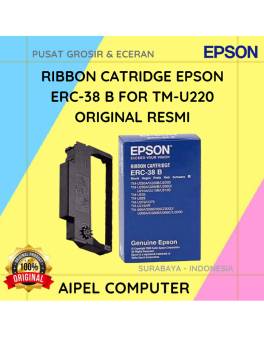
20%
A. DESKRIPSI (DESCRIPTION) Ribbon Cartridge EPSON ERC-38 B For TM-U220 Original 100% adalah solusi cetak berkualitas tinggi untuk menunjang kebutuhan… selengkapnya
Rp 36.000 Rp 45.000
27%
A. DESKRIPSI (DESCRIPTION) Cable Type-C M To M GENAI GL-Q37 adalah solusi terbaik bagi pengguna modern yang membutuhkan kabel fleksibel,… selengkapnya
Rp 27.000 Rp 37.000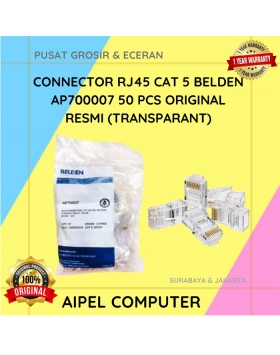
18%
A. DESKRIPSI (DESCRIPTION) Kabel UTP CAT 5 BELDEN 1583A adalah pilihan ideal untuk kebutuhan jaringan Anda. Dengan panjang 305 meter… selengkapnya
Rp 125.000 Rp 153.000
8%
A. DESKRIPSI (DESCRIPTION) Refill Ink 1 Liter Magenta CENTROO adalah tinta isi ulang premium yang memberikan warna tajam dan stabil, cocok… selengkapnya
Rp 78.000 Rp 85.000
5%
GARANSI * AIPEL COMPUTER – Pusat Grosir & Eceran – Belanja Hebat & Hemat – Grosir Konsep Swalayan – Harga… selengkapnya
Rp 485.000 Rp 510.000
11%
GARANSI * AIPEL COMPUTER – Pusat Grosir dan Eceran – Belanja Hebat dan Hemat – Harga Murah Garansi Prima *… selengkapnya
Rp 125.000 Rp 140.000
16%
GARANSI * AIPEL COMPUTER – Pusat Grosir & Eceran – Belanja Hebat & Hemat – Grosir Konsep Swalayan – Harga… selengkapnya
Rp 63.000 Rp 75.000
8%
A. DESKRIPSI (DESCRIPTION) Keyboard + Mouse Wireless LOGITECH MK220 adalah kombinasi keyboard dan mouse wireless dari LOGITECH yang dirancang untuk… selengkapnya
Rp 303.000 Rp 330.000
32%
A. DESKRIPSI (DESCRIPTION) Earphone GENAI GM-M18 adalah perangkat audio minimalis namun powerful yang memberikan pengalaman mendengarkan lebih imersif. 🤍 Dilengkapi… selengkapnya
Rp 32.000 Rp 47.000
20%
A. DESKRIPSI (DESCRIPTION) Processor 1151 I3 6100 3.70 GHz Tray No Fan Original 🚀 adalah pilihan solid bagi pengguna yang… selengkapnya
Rp 172.500 Rp 215.000



Saat ini belum tersedia komentar.