- Orderan dibawah 500.00 via Goshop / Offline / Marketplace
Laptop Screen Black but Power Light On? Causes and Easy Fixes
Pressing your laptop’s power button, hearing the internal cooling fans spin, seeing power LEDs glow, but finding the display stuck on a completely pitch-black screen is unsettling. This blank display symptom triggers immediate worry, making owners assume their laptop died completely even while internal hardware runs.
A laptop powering on with no display output usually indicates an initial Power-On Self-Test (POST) failure. The issue is frequently caused by oxidized RAM pin contacts, trapped static energy on motherboard circuits, or loose display cable connections. Much like troubleshooting steps in laptop wont turn on at all check this before repairing to identify hardware faults, you can perform basic recovery steps on your own before sending your machine to a repair center.
Featured Snippet (Quick Answer):
To fix a laptop that powers on with a black screen, perform a static hard reset (hold the power button for 30 seconds unplugged), hook up to an external monitor via HDMI, clean the gold RAM contact pins using a pencil eraser, or reset the graphics drivers using the Windows shortcut (
Win + Ctrl + Shift + B).
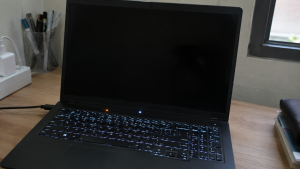
Checklist: Confirming Black Screen Hardware Symptoms
Check the boxes below if your laptop shows any of these conditions:
-
[ ] Power indicator lights and battery charging LEDs glow steadily.
-
[ ] Cooling fans spin at high speeds shortly after pressing power.
-
[ ] The Caps Lock or Num Lock keys light up when pressed (confirming OS response).
-
[ ] The display remains totally dark without any faint background glow.
-
[ ] The issue appeared right after traveling, bumps, or long idle storage.
Practical Recommendation: Do not force-restart repeatedly. Connect your laptop to a TV or monitor via HDMI to verify whether the system works.
Comparison Table: Causes of Black Screen Symptoms and Fixes
Here is an overview of why laptops power on without a display signal and how to resolve them:
| Hardware Symptom | Likely Cause | Component Risk | Recommended Action |
|---|---|---|---|
| Black screen, Caps Lock lights | Dirty / oxidized RAM copper pins | Fails to initialize system memory | Clean RAM pins with an eraser |
| Dark screen, external TV works | Loose or severed eDP display cable | Screen video feed cut off | Reseat internal LCD cable socket |
| Fans roar, motherboard freezes | Trapped motherboard static charge | System BIOS lockup (freeze) | Disconnect battery & hard reset |
| Faint image under flashlight | Burned out LCD backlight inverter | Backlight power circuit failed | Replace backlight inverter / LCD |
4 Steps to Fix a Laptop That Turns On with a Black Screen
Follow these recovery steps in order:
-
Perform a Static Charge Hard Reset. Disconnect the AC charger and remove the battery (if detachable). Press and hold down the Power button firmly for 30 to 60 seconds to drain lingering static charge trapped inside motherboard capacitors. Reconnect the charger and power on the laptop.
-
Use the Graphics Driver Reset Key Shortcut. If running Windows, press Win + Ctrl + Shift + B simultaneously. The laptop will emit a brief system beep, signaling that Windows is refreshing the display driver subsystem.
-
Test Video Signal on an External Monitor or TV. Plug an HDMI cable from your laptop into an external computer monitor or TV. If the external screen shows your Windows desktop, your motherboard, processor, and RAM are operating fine. The problem lies strictly with the laptop display panel or internal cable.
-
Remove and Clean Gold RAM Contact Pins. Unscrew the RAM compartment on the bottom casing. Release the side mounting clips, remove the memory modules, and gently rub the gold contact pins with a pencil eraser to strip away oxidized grime. Reseat the RAM firmly until the clips snap in place.
When to Seek Professional Hardware Repair
If cleaning the RAM and testing an external monitor yields zero video output, or the Caps Lock light blinks in specific timed patterns (blink code errors), the fault lies within motherboard hardware.
These symptoms usually indicate corrupted BIOS firmware or a failed dedicated GPU chip, requiring technician service using specialized BIOS programmers or professional BGA soldering equipment.
FAQ (Frequently Asked Questions)
What is the difference between a black screen and a dead laptop?
A dead laptop receives zero electrical power (LED lights remain dark, fans do not turn). A black screen condition receives normal electrical power, but the motherboard fails to project visual data onto the LCD panel.
Why does shining a flashlight on the screen help diagnose problems?
If shining your smartphone flashlight onto the dark screen reveals faint outlines of Windows desktop icons, your LCD panel works, but the backlight illumination circuit has failed.
Conclusion
A laptop turning on with a black screen is usually caused by static power lockups, oxidized RAM pins, or loose display cables. By performing a static power drain and cleaning memory contacts, you can quickly restore display functionality without spending money on unnecessary part replacements.
Shop RAM Modules, LCD Panels & Service at Aipel Computer
Looking for genuine DDR4/DDR5 RAM upgrades with factory warranty, replacement LCD video cables, brand-new laptop screens, or expert motherboard repairs? Discover a complete inventory of computer parts at wholesale prices directly in our store.
To check component compatibility or get store directions, visit the official Aipel Computer website in Surabaya today.
Tags: clean laptop ram pins, fix laptop turns on but no display, laptop black screen of death, laptop repair surabaya, laptop screen black but power light on

Laptop Screen Black but Power Light On? Causes and Easy Fixes
Jantung serasa berhenti berdetak saat cangkir kopi, teh manis, atau segelas air mineral di samping mejamu tersenggol dan cairannya langsung... selengkapnya
Pernahkah kamu sedang asyik bermain game favorit atau melakukan proses rendering video berat, lalu tiba-tiba laptopmu terasa sangat panas, suara... selengkapnya

Layar laptop bergaris bisa disebabkan oleh berbagai faktor, dan mengetahui penyebabnya akan memudahkan Anda dalam mengatasinya. Mengingat laptop adalah perangkat... selengkapnya

Tombol Esc pada keyboard memiliki berbagai fungsi yang berbeda. Berikut adalah beberapa kegunaan dari tombol Esc atau Escape pada keyboard... selengkapnya
Cara mengatasi blue screen Windows 10 mungkin cukup membingungkan. Hal itu karena tidak semua orang memahami komputer dengan baik. Dengan... selengkapnya
CPU komputer tidak mau menyala memang dapat menghambat pekerjaan dan sering kali membuat pengguna panik. Namun, jika CPU dibeli dari... selengkapnya
Pernahkah kamu mencolokkan charger ke laptop, melihat indikator pengisian daya aktif di taskbar, namun saat kursor diarahkan muncul keterangan “Plugged... selengkapnya
Modem 4G Prolink merupakan teknologi terkini yang menghadirkan inovasi baru dalam dunia jaringan internet dan perangkat pintar. Ini merupakan modem... selengkapnya

Layar laptop terbalik tentu sangat mengganggu. Jika Anda mengalami masalah ini, berikut beberapa cara untuk mengembalikan layar laptop ke posisi... selengkapnya
TPLINK CPE220 bisa menjadi pilihan untuk mendapatkan perangkat access point outdoor dengan harga yang cukup terjangkau dan berkualitas. Access point... selengkapnya
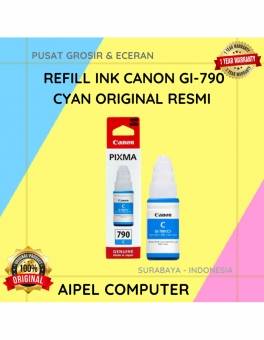
7%
A. DESKRIPSI (DESCRIPTION) Canon GI-790C adalah refill ink berkualitas tinggi dalam warna cyan yang dirancang khusus untuk printer Canon. Dengan… selengkapnya
Rp 102.000 Rp 110.000
6%
AIPEL COMPUTER – Pusat Grosir dan Eceran – Belanja Hebat dan Hemat – Harga Murah Garansi Prima * GARANSI –… selengkapnya
Rp 189.000 Rp 200.000
36%
A. DESKRIPSI (DESCRIPTION) Pasta Processor Suntik Besar adalah produk yang dirancang untuk memberikan perlindungan dan perawatan maksimal pada processor Anda…. selengkapnya
Rp 9.000 Rp 14.000
8%
A. DESKRIPSI (DESCRIPTION) Adaptor Laptop ASUS 19V 6.32A DC dengan konektor 4.5mm x 3.0mm adalah pilihan ideal bagi pengguna yang… selengkapnya
Rp 185.000 Rp 200.000
13%
A. DESKRIPSI (DESCRIPTION) Kabel Audio 3.5 M To RCA-2 M CENTROO 3 M adalah solusi praktis untuk menghubungkan berbagai perangkat… selengkapnya
Rp 13.000 Rp 15.000
21%
A. DESKRIPSI (DESCRIPTION) Kabel Power Printer CENTROO 1.5 M (Black) adalah solusi ideal untuk kebutuhan daya printer Anda. Dengan panjang… selengkapnya
Rp 5.500 Rp 7.000
9%
A. DESKRIPSI (DESCRIPTION) Earphone Wireless GENAI TWS P210 Earbuds adalah produk stylish dengan performa andal untuk mendukung gaya hidup aktif… selengkapnya
Rp 122.000 Rp 134.000
20%
A. DESKRIPSI (DESCRIPTION) Tang Crimping CENTROO Double for Cat 6 adalah alat teknisi jaringan yang ideal untuk pemasangan kabel LAN… selengkapnya
Rp 165.000 Rp 205.000
17%
A. DESKRIPSI (DESCRIPTION) Adaptor Laptop HP 19V 4.74A DC (7.4*5.0) Panjang Jarum Kabel Power adalah pilihan ideal bagi kamu yang… selengkapnya
Rp 75.000 Rp 90.000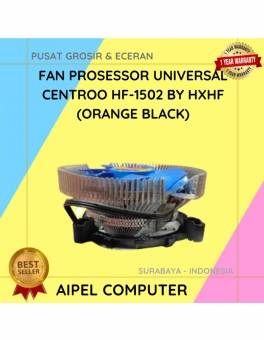
35%
A. DESKRIPSI (DESCRIPTION) Fan Processor Universal CENTROO By HXHF adalah kipas pendingin berkualitas tinggi untuk menjaga suhu prosesor tetap stabil… selengkapnya
Rp 36.000 Rp 55.000



Saat ini belum tersedia komentar.