- Orderan dibawah 500.00 via Goshop / Offline / Marketplace
Laptop M.2 NVMe SSD Not Detected in BIOS and Windows? Causes and Fixes
Have you ever powered on your laptop, only to be startled by a black screen displaying “Boot Device Not Found” or unexpectedly booting straight into the BIOS menu without entering the Windows operating system?
An M.2 NVMe SSD suddenly failing to detect inside BIOS or Windows represents one of the most terrifying storage hurdles for modern users. Users frequently panic immediately, assuming their data storage chips have destroyed permanently while all precious photos and important documents vanish forever. However, in numerous cases, this trouble stems from M.2 slots choked by fine dust, SSD sticks shifting slightly from mechanical vibrations, or SSD controller chips suffering extreme thermal throttling from overheating.
Furthermore, much like troubleshooting sluggish storage performance anomalies in laptop ssd slow read-only mode causes fixes, systematic inspections spanning BIOS configurations down to physical M.2 slot cleanings are vital to restoring storage systems. Additionally, electrical stability can be maintained by reviewing insights from laptop giving shocks while charging causes fixes.
Featured Snippet (Quick Answer):
Primary causes of M.2 NVMe SSDs failing to detect in BIOS include SSD sticks unseated improperly inside sockets, brass connector pin oxidation, or SSD controller failures stemming from excessive overheating temperatures.
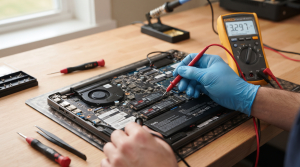
Checklist: Evaluating NVMe SSD Failure Severity
Check the boxes below if these NVMe storage symptoms match your current situation:
-
[ ] Laptops power on, boot straight into BIOS menus, and list Storage Information as completely blank.
-
[ ] Laptops suffered sudden Blue Screen of Death (BSOD) crashes prior to failing boot sequences.
-
[ ] Lower laptop casing shells near storage bays feel intensely hot during heavy workloads.
-
[ ] SSDs were unseated/reseated previously or laptops sustained hard bumps inside carry bags.
Practical Recommendation: Avoid formatting or discarding your SSD immediately! Enter BIOS menus first to inspect whether M.2 slot ports still detect the presence of that SSD stick’s brand identification.
Comparison Table: NVMe SSD Failure Types & Actions
| NVMe SSD Failure Symptom | Underlying Cause | Damage Risk | Recommended Action |
|---|---|---|---|
| Completely Unrecognized in BIOS | Loose SSD sticks or dirty brass connector pins | Operating systems losing boot path trajectories | Detach SSD, clean pins & reseat securely |
| Detects Briefly Then Disappears | Extreme thermal throttling from overheating | Permanent damage across SSD controller chips | Install auxiliary heatsinks & clean fans |
| “Disk Read Error” Pop-ups | Storage sectors encountering data corruption | Random losses of Windows system files | Execute CHKDSK via Windows installation media |
| Detected But Write-Protected (Read-Only) | Write-protection modes active due to worn flash memory | Data readable without saving capabilities | Backup data promptly & replace with new SSDs |
4 Ways to Fix M.2 NVMe SSDs Not Detected
-
Clean Brass Pins and Reseat NVMe SSDs.
Power down your laptop completely, detach internal batteries (if accessible), and open rear chassis panels. Remove M.2 NVMe locking screws gently, pull out SSD sticks, clean brass pins utilizing clean pencil erasers or isopropyl contact cleaner fluids, then reinsert sticks at roughly 30-degree angles until locked down securely. Additionally, if you face related storage performance anomalies, review proper troubleshooting procedures in laptop ssd overheating thermal throttling freeze causes fixes.
-
Verify Storage Mode Settings in BIOS (AHCI / NVMe).
Boot laptops while tapping designated keys repeatedly (e.g., F2, F12, or Del) to enter BIOS. Ensure Storage Configuration or SATA/NVMe Mode settings point to AHCI or NVMe Native, rather than RAID modes that frequently lock direct access to SSD sticks.
-
Update Chipset Drivers and SSD Firmware.
If SSDs detect inside Windows yet disconnect intermittently, ensure you update chipset drivers sourced from your laptop manufacturer’s official portal alongside installing proprietary SSD utility software (e.g., Samsung Magician or Kingston SSD Manager) to update latest firmware.
-
Execute Motherboard Hard Resets (Power Drains).
Unplug chargers and all external peripherals, then press and hold the power button continuously for roughly 40 seconds. This refreshes power supply circuitry across motherboard chipsets governing communication pathways toward PCIe/M.2 slots.
When to Seek Professional Repair Services
If you have reseated SSDs, cleaned pins, tested secondary M.2 slots (if available), yet SSDs stubbornly refuse detection across alternative laptops, malfunctions reside directly inside the SSD sticks themselves or motherboard PCIe circuitry.
This condition requires inspecting M.2 slot voltage pathways, re-soldering sockets, or replacing new SSD sticks executed by experienced technicians at trusted service centers.
FAQ (Pertanyaan yang Sering Diajukan)
Can data inside unrecognized NVMe SSDs still be rescued?
Highly dependent on failure roots. If trouble stems strictly from dirty pins or loose slots, data remains safe post-cleaning. However, if controller chips inside SSDs burn out from electrical shorts, data recovery demands specialized data recovery services inside professional laboratories.
Shop OEM SSD Parts & Professional Repairs at Aipel Computer
Discover original warranted M.2 NVMe SSD spare parts, storage slot cleaning and repair services, and professional warranted laptop servicing in Surabaya directly through Aipel Computer.
Tags: cara memperbaiki ssd nvme hilang di bios windows 11, ganti ssd aipel komputer, servis slot ssd laptop surabaya, ssd m2 nvme laptop tidak terdeteksi bios windows penyebab solusi

Laptop M.2 NVMe SSD Not Detected in BIOS and Windows? Causes and Fixes

Komputer menjadi salah satu peralatan yang memiliki cukup banyak manfaat, apalagi beberapa pekerjaan bahkan beberapa kantor sendiri juga menggunakan komputer.... selengkapnya
Kondisi laptop yang mendadak mengeluarkan suara dengungan kipas sangat kencang sering kali memicu kepanikan. Udara panas mendadak menyembur dari ventilasi... selengkapnya

Memilih toko komputer pastinya tidak boleh sembarangan. Sebab, pemilihan toko yang tepat akan menentukan kualitas dan harga komputer yang nantinya... selengkapnya
Dealing with a slow laptop or a sluggish system when you are rushing to meet a task deadline can definitely... selengkapnya

Memilih keyboard komputer yang tepat merupakan langkah penting dalam mendukung produktivitas saat bekerja atau menyelesaikan tugas. Terutama ketika menggunakan komputer... selengkapnya

Spyware komputer mungkin masih terasa asing bagi sebagian orang. Istilah ini berbeda dari CPU, mouse, dan keyboard yang sudah sering... selengkapnya

USB hub 4 port bisa menjadi pilihan untuk pelengkap komputer. Port pada komputer atau laptop memang sangat terbatas. Sehingga sebagian... selengkapnya
Pernahkah kamu mencolokkan charger laptop ke stopkontak dinding, lalu tiba-tiba terdengar suara mendesis halus seperti minyak goreng panas disertai letupan... selengkapnya

Seiring dengan berkembangnya teknologi saat ini, komputer desktop atau PC pun juga mengalami banyak perkembangan. Di toko komputer banyak tersedia... selengkapnya

Pusat grosir komputer adalah tempat yang tepat untuk Anda membeli berbagai macam aksesoris. Selain karena lebih banyak pilihan, harga yang... selengkapnya

20%
A. DESKRIPSI (DESCRIPTION) Adaptor Universal CENTROO 5V 1A DC 5.5 x 2.5 adalah adaptor serbaguna yang memberikan pasokan daya konstan… selengkapnya
Rp 16.000 Rp 20.000
15%
A. DESKRIPSI (DESCRIPTION) Kabel HDTV CENTROO 25 Meter Jaring adalah pilihan sempurna bagi Anda yang memerlukan koneksi HDMI jarak jauh… selengkapnya
Rp 89.000 Rp 105.000
40%
GARANSI * AIPEL COMPUTER – Pusat Grosir & Eceran – Belanja Hebat & Hemat – Grosir Konsep Swalayan – Harga… selengkapnya
Rp 18.000 Rp 30.000
20%
AIPEL COMPUTER Switch HDTV HOBOO 1-3 HQ Manual 4K adalah perangkat andalan yang memungkinkan kamu beralih tampilan antar tiga perangkat… selengkapnya
Rp 60.000 Rp 75.000
8%
A. DESKRIPSI (DESCRIPTION) Memperkenalkan BODI256N, sebuah solid-state drive (SSD) berkapasitas 256 GB yang dirancang untuk memberikan performa maksimal bagi sistem… selengkapnya
Rp 280.000 Rp 305.000
8%
A. DESKRIPSI (DESCRIPTION) Printer EPSON L3211 Print Scan Copy Original 100 % (Black – 003 CMYK) adalah printer multifungsi yang… selengkapnya
Rp 2.065.000 Rp 2.250.000
30%
A. DESKRIPSI (DESCRIPTION) Adaptor Universal CENTROO 9V 1A DC 5.5 x 2.5 adalah solusi praktis untuk Anda yang membutuhkan suplai… selengkapnya
Rp 14.000 Rp 20.000
26%
A. DESKRIPSI (DESCRIPTION) Kabel Audio Optical CENTROO 3 M OD 5.0 adalah solusi terbaik untuk menghadirkan kualitas audio digital tanpa… selengkapnya
Rp 40.000 Rp 54.000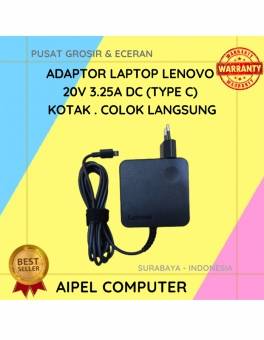
10%
A. DESKRIPSI (DESCRIPTION) Adaptor Laptop LENOVO 20V 3.25A Type C Kotak Colok Langsung adalah perangkat power supply dengan desain kotak… selengkapnya
Rp 135.000 Rp 150.000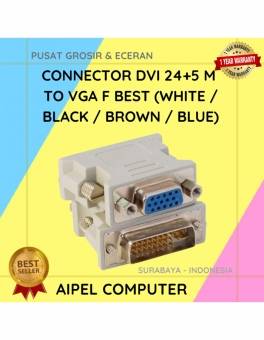
32%
A. DESKRIPSI (DESCRIPTION) DVI 24+5 M ke VGA F BEST adalah konektor andalan untuk menghubungkan perangkat berport DVI ke layar… selengkapnya
Rp 6.500 Rp 9.500



Saat ini belum tersedia komentar.